How it works
Airtable tells us about every change. We save it, check it every night, and keep it where nothing can delete it.
Live updates
Every change, as it happens
When you connect a base, the service registers one Airtable webhook for it, asking for changes to records, fields and tables with the previous cell values included. Airtable pings the service when something changes; the service waits a moment for the burst to finish, collects the changes, and saves each as an entry in the change history: who, when, which record, which field, the value before and the value after. At the Standard speed a burst of edits is saved about 30 seconds after the last one during working hours.
Live updates stay on at every backup speed, and an idle base costs almost nothing: no change, no call. Airtable keeps unsent notifications for seven days, so a pause on our side (an update, a restart) is caught up on restart, and the webhook is renewed before Airtable’s seven-day expiry. If live updates are ever reset, the activity list says so and that night’s check fills the gap.
The nightly backup and the nightly check
A full copy every night, and every difference explained
Each night the service reads every table in full and saves the result as that night’s backup. The nightly backup is what makes “any table at any moment” fast: a moment is the nearest nightly backup before it plus the changes since, replayed forward.
Then the nightly check compares the backup with Airtable, cell by cell, and sorts every difference into a reason:
- a calculated field Airtable recalculated itself;
- the other side of a link someone edited;
- a change already in the history (only the backup copy needed refreshing);
- a change made while the backup was paused;
- a notification that was missed and has now been recovered;
- or unexplained, which is the only one that means something was missed, and the only one that needs a person.
The backup is brought up to date either way; the reasons are charted on Health so a quiet night reads as quiet. Every table is read every night, including tables the history shows as idle, because a dropped notification looks exactly like idleness.
Alerts that mean something
More than 50 deletions or more than 100 writes to the same field in ten minutes sends an alert with a link straight into Batch Fix. A table or field rename is announced. A webhook that cannot be renewed, a nightly backup that did not run, a restore test that failed, Airtable access that needs reconnecting, a payment that did not go through: each is an email to the addresses you chose, and a line on Health.
Every morning a nightly report is emailed per account: what was saved, what the check found, what was restored, with conclusions only from evidence and unknowns stated as unknowns.
Backup speed
Four settings, named by what you get
Instant
Every change saved within seconds, day and night. Full backup every night.
Standard
Changes saved within a minute during working hours, within 15 minutes after hours. Full backup every night. The default.
Light
Changes saved within a few minutes. Full backup and comments every 2 days.
Minimal
Live updates still on; changes saved within 15 minutes. Full backup and comments weekly.
The speed decides how long a burst of edits is allowed to settle before it is saved and how often Airtable is read in full. Live updates are on at every setting. Light and Minimal exist for bases that must stay well inside Airtable’s request limits; Instant is for the base where a minute matters.
Storage
Your backup, where it lives
- Where
- In the operator's AWS account, region us-west-1 (Northern California), in Amazon S3. Each base's backup lives under its own prefix; the service answers "not found" for any base that is not the signed-in account's.
- Attachments once
- Every file is stored by its content hash. A file attached to many records, or re-attached across many versions, is kept exactly once. Older files move to a colder storage class after 30 days and stay instantly restorable.
- Nothing can be deleted
- The bucket keeps every version of every object, and its policy denies deletion to every identity, including the running service, except a separate break-glass role that requires multi-factor authentication to assume. A mistaken or malicious deletion is reversible.
- Encrypted
- TLS on every connection. Server-side encryption at rest in S3. Airtable tokens sealed field by field under per-record data keys wrapped by AWS KMS.
The box that runs the service is disposable: its working database rebuilds from the backup in about ten minutes, and a nightly copy of it goes to a second bucket. The backup in S3 is the thing that is kept, and it is kept under rules the service itself cannot change.
The security page: who can read what, what is encrypted, what is not claimed →
The console
Five pages, written in your words
Home
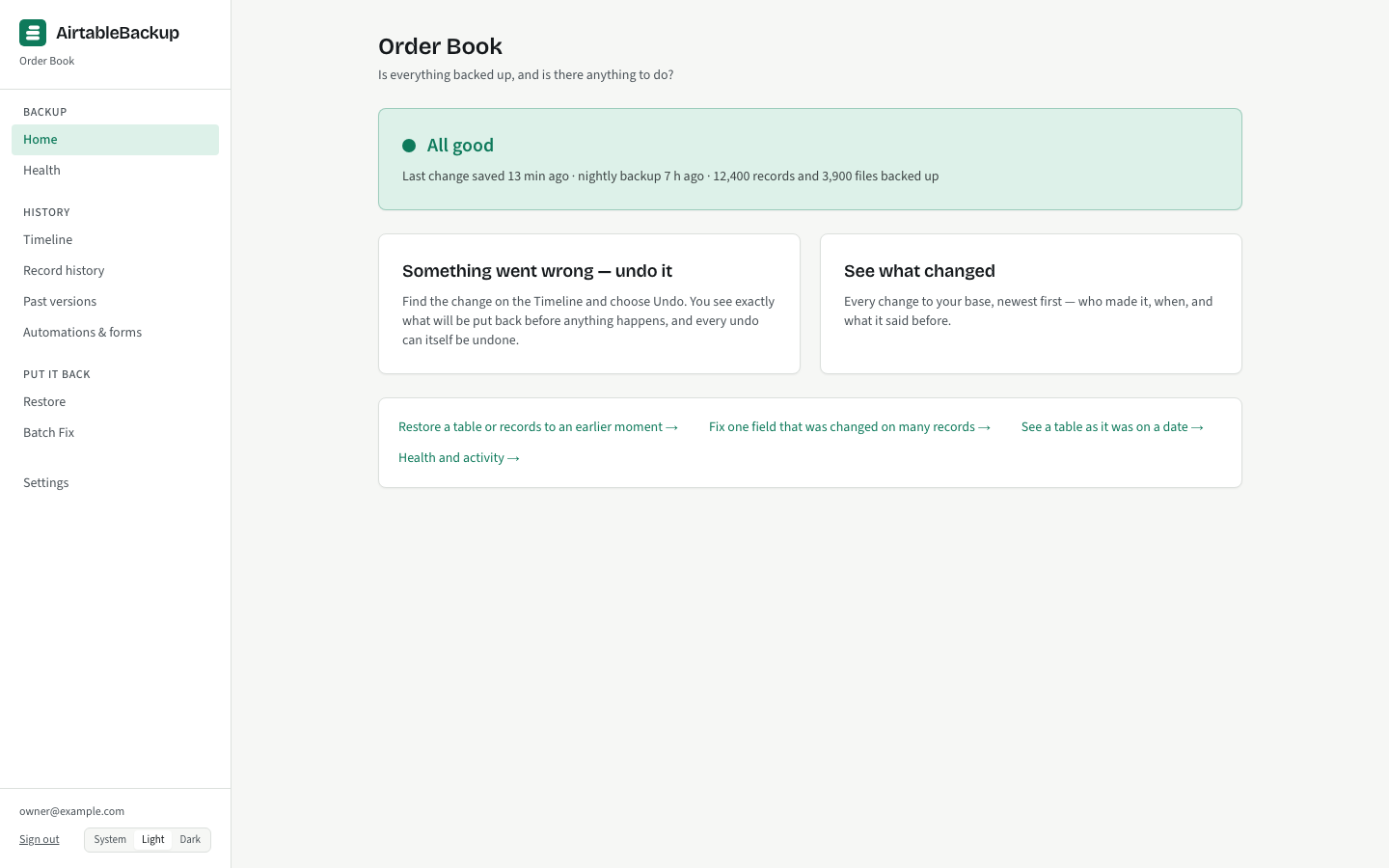
One verdict, and why: All good, Watch, or Needs attention, with the count of records and files backed up, when the last change was saved, and two buttons: "Something went wrong — undo it" and "See what changed". If something needs a person, the reason is the first line, never a colour alone.
Timeline
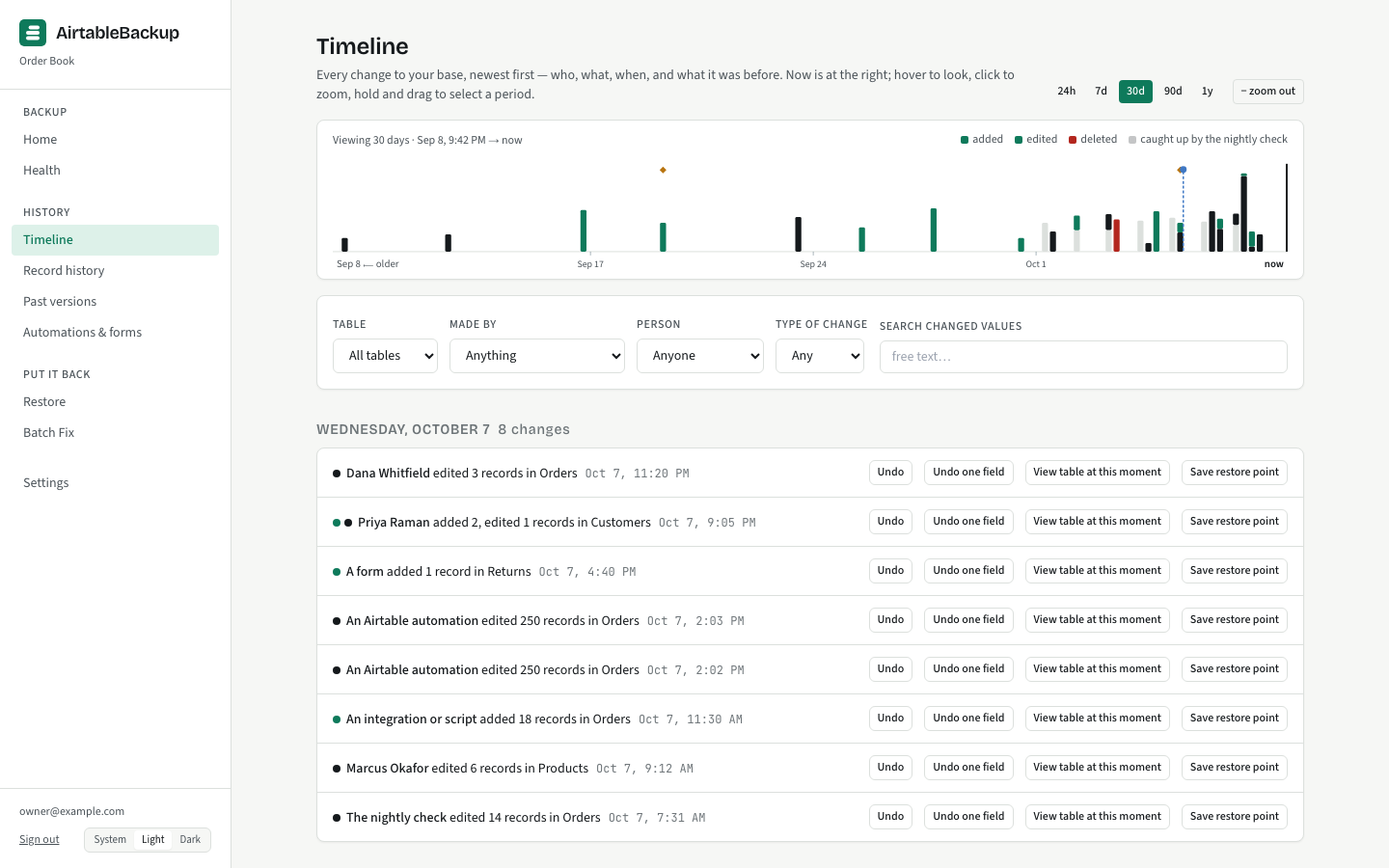
An activity graph by day above a feed of changes grouped by day. Each row is a sentence with a name on it and offers Undo, Undo one field, View table at this moment, and Save restore point. Filter by who made the change: a person, an automation, a form, an integration, a synced table, or the nightly check.
Record history
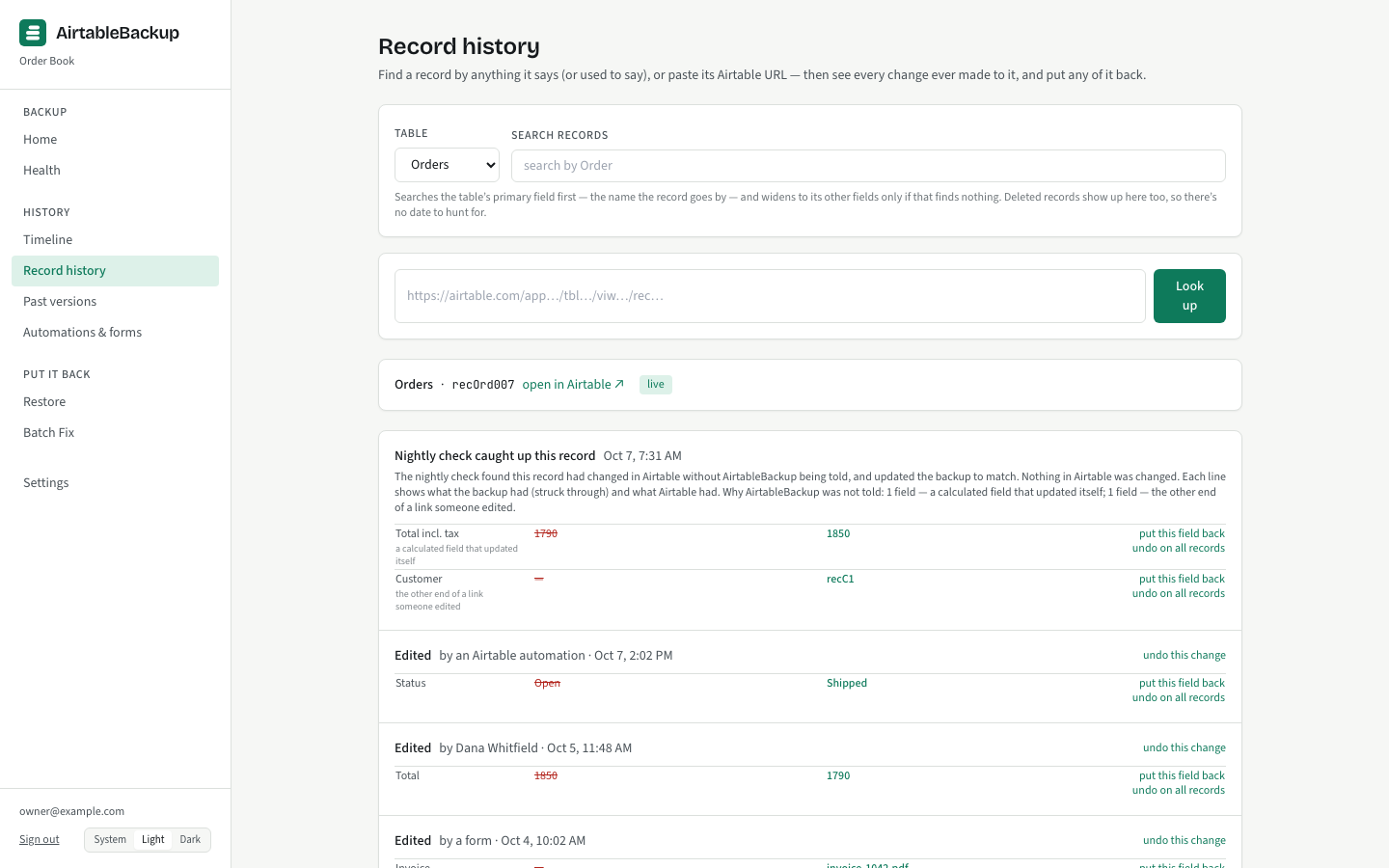
Find one record by name or paste its Airtable link, and read everything that ever happened to it in order: the author, the time, the field, the before and the after. Any change can be undone from here.
Health
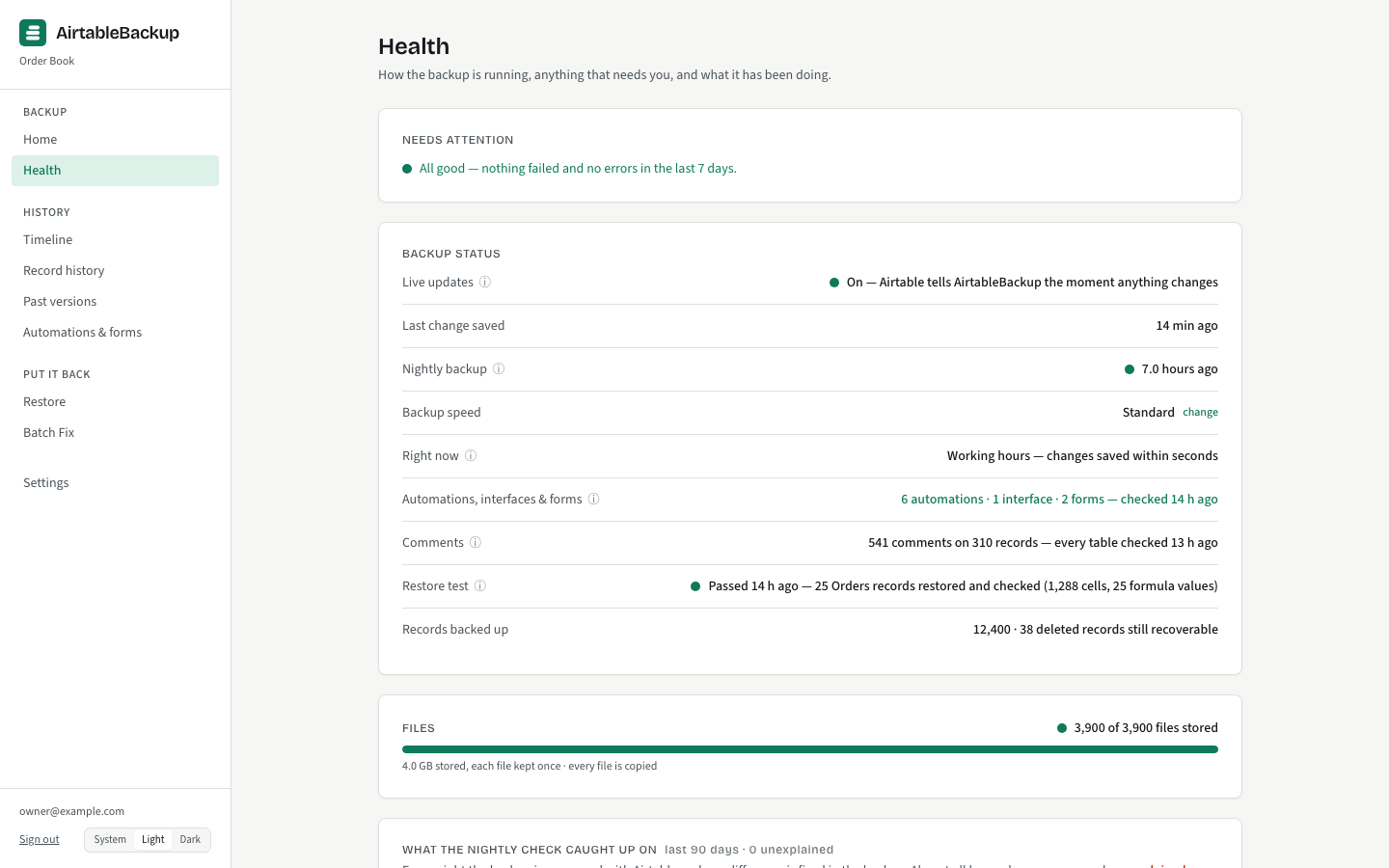
What needs attention first, then backup status, files progress, the nightly check’s differences charted by reason, the last restore test, and the activity list. "Details for admins" holds the technical evidence under each item for the person who wants it.
Settings
Backup speed, your bases, restore points, who gets alerts and at what level, the nightly report, the nightly restore test, Airtable connections, people and billing. Alerts are email, to addresses an owner adds, with Send a test and a No email option.
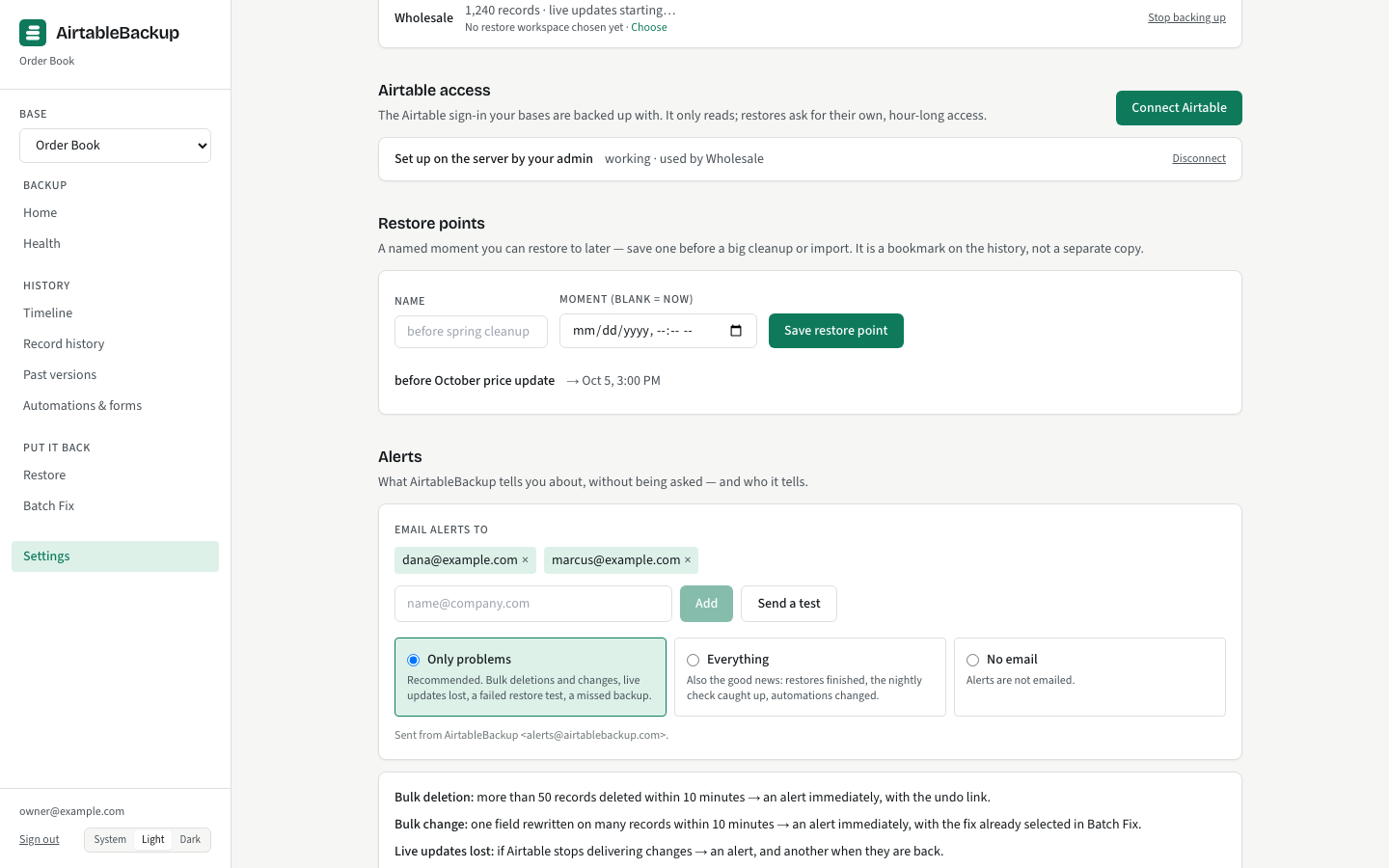
The vocabulary is deliberate. A change is a change, the history is the change history, the copy taken each night is the nightly backup, the comparison is the nightly check, a saved moment is a restore point, putting a change back is undo, the setting is backup speed. Engine words (commits, anchors, sweeps, webhooks) stay under “Details for admins”.